Chrome extension for the UK motor trade
Full MOT history on every lot. One right-click.
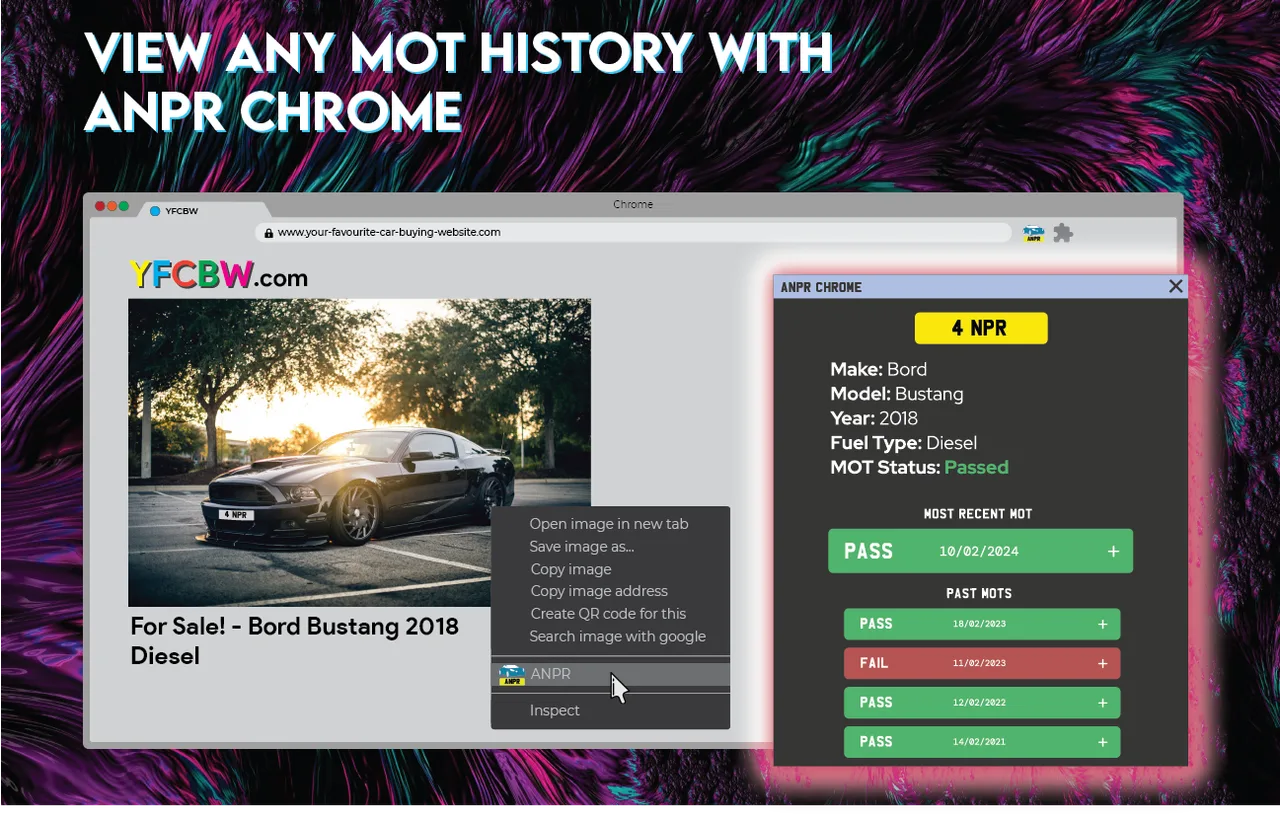
Right-click a car photo on BCA, Manheim, Marketplace or any other site. The plate is read and the full DVSA MOT history opens on the same page. No tabs, no typing regs. Check the next car.
- Works on
- BCA
- Facebook Marketplace
- Manheim
- Any site with car photos
The problem
Sourcing stock means checking hundreds of cars.
- You scroll hundreds of lots to find stock, looking at the photos anyway.
- The listing shows plenty, but not the full MOT history.
- Checking means a new tab, typing the reg, and doing it again for the next car.
On a listing
The history opens next to the car.
How it works
How the MOT history check works
- 01
Right-click
Any car photo with the plate in view. Auction listing, Marketplace ad, forum post.
- 02
Plate read
The extension reads the number plate straight off the image.
- 03
MOT history
Full DVSA history opens in a popup on the same page. Passes, fails, advisories, mileage.
Who it is for
Built for the motor trade. You check the MOT anyway.
Trade buyers
Buying 100 to 1,000 cars a year? Check every lot's MOT before you bid, straight from the catalogue.
Dealers sourcing stock
Rule out bad stock in one click. Advisories, fails and mileage gaps show before you spend time on it.
Regular browsers
Flip a few cars a year or just like looking? The free tier covers 100 checks a month.
Buying one car for the family? The GOV.UK check will do. This is for people who check cars all day.
Pricing
Pennies a lookup. Free to start.
Free tier
100
lookups every month
No card needed. Sign in with the extension.
Top up
Buy credits when you need more. One credit is one lookup. Repeat lookups of the same image are free.
| Buying | Per lookup |
|---|---|
| 200+ credits | 2.5p |
| 500+ credits | 2p |
| 1,000+ credits | 1.75p |
FAQ
Questions
I can check MOTs free on GOV.UK. Why pay?
You can, one car at a time, typing each reg in another tab. This checks the car in the photo you are already looking at, in one click. Fine for one car. Slow for a catalogue.
Is it a subscription?
No. You get 100 free credits a month, and you buy more only when you need them.
Where does the MOT data come from?
The official DVSA MOT History API. The same record the government holds.
What does it cost?
The free tier gives you 100 credits a month. One lookup is one credit. Need more? Buy them from 2.5p each, down to 1.75p in bulk. Minimum 200.
Do I pay twice for the same car?
No. Look up the same image again and it is not charged.
Which cars does it work on?
UK-registered vehicles with the plate visible in the photo.
Which browsers?
Chrome, and Chromium browsers that install from the Chrome Web Store.